But sometimes someone outside of your department, or without access to your email box, has to have an insight into your private email, or even respond to it. In this case all you have to do is share the message with him/her. You can do it in your inbox, by clicking on the cog icon by the right side and selecting Share post for coworkers.
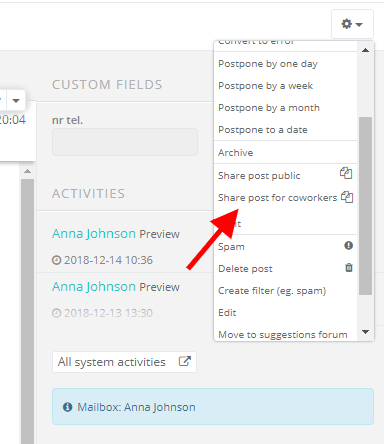
After selecting this option, an email you want to share will be opened in a new browser window. Copy its URL address (eg. https://accountsname.sugester.pl/app/posts/2xxxxxx0/c10xxxxxxe) and share it with a chosen user.
With this feature you can share posts:
- with a person from a different department
- with a person who doesn't have access to emails (unmarked 'inbox' role)
- with a person with no access to the Unassigned folder (unmarked 'Can access others' items in their department(s)' role)
- with a person with access to own posts ('User restricted to helpdesk' role)
- from your private email box