- send personalized text messages. It will sure increase your client's commitment
- send texts with birthday wishes
- send SMS campaigns about new products or sales in your company
- receive SMS notification about important email
- receive SMS notification about new invoices (for Invoice Ocean client's)
- monitor your employees work in the system. Eg. you can receive a text when your employee adds new activity in client's profile or an info about sale.
To send texts to your clients and get SMS notification - create an account at https://www.smsapi.com/
Then, go to the menu Settings > Account Settings > Integration > Smsapi.com integration and paste the data from your account at smsapi.com: "Smsapi username email" and "API Password (md5) smsapi" and click SAVE.
1. Copy email address from SMSAPI

2. Copy API Password (md5)
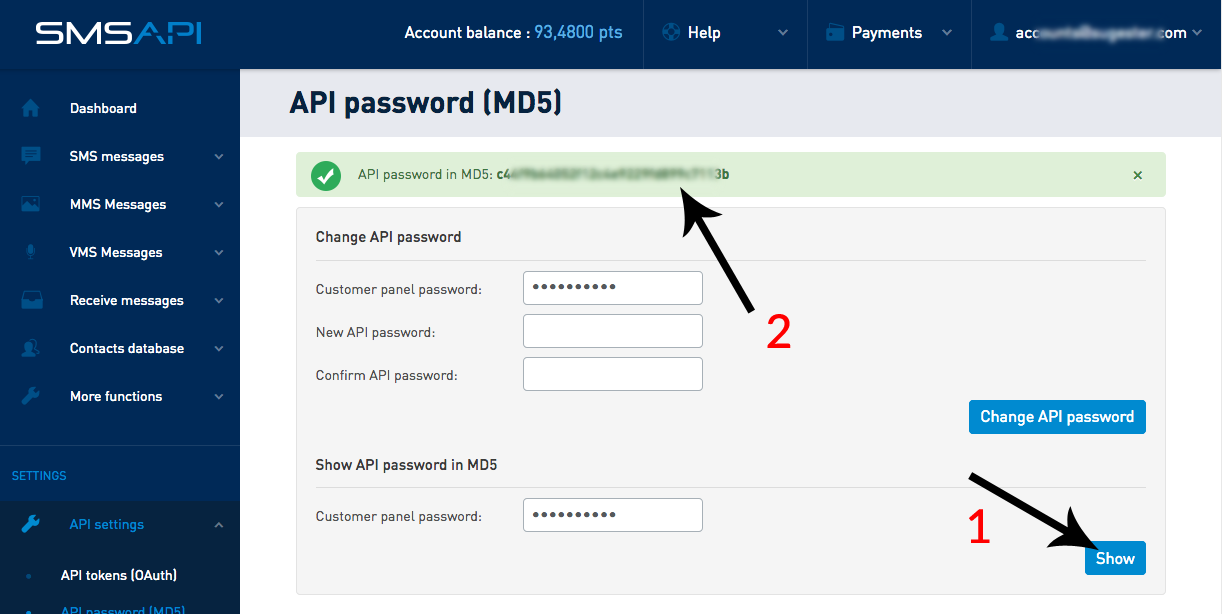
3. In Sugester go to Settings > Account settings > Integrations > Integration with SMSAPI.com. Mark the checkbox, and input your email address and API password. To check, if the integration works properly, select Test shipping SMS.
