CRM Settings
nowy
Dynamic list, reccuring tasks
Updated at:
•
Number of views: 1717
•
1 min read
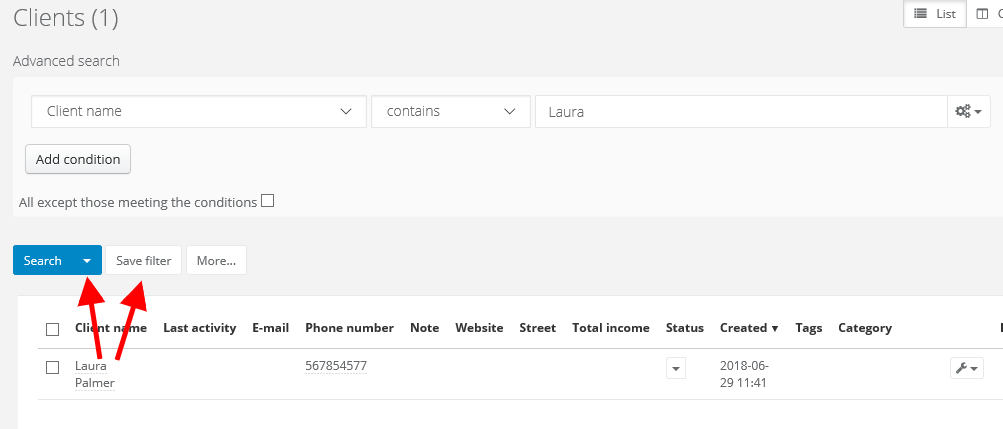
To enable automatic notifications eg about clients' birthdays, first (on the client's list) you have to create dynamic list. To do that, select CRM > Clients > Advanced search. After searching save your results by clicking on Save filter. Later you will find it on the filters list, when you unfold the arrow next to Search.
Next, in Settings > Automation > Reccuring tasks create a new task. In 'Kind' field select 'Launching the filter', then in 'Filter' select dynamic list you've created.
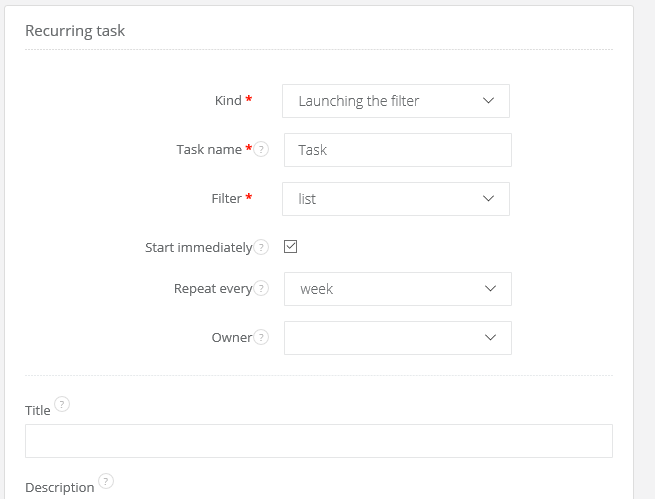
Such tasks we can later assign to a user or a group.
Thanks to dynamic list in advanced search we can get a kind of notifications about changes in clients.